Skip to content
GoTool Español

For development, QA, websites and servers

GoTool: the tool that understands and protects your project.

GoTool reads your whole project —PHP, TypeScript, JavaScript, Go, SQL and everything around it—, draws it, tests it and tells you what is going to break before you push it. And it watches over its security, on your computer and on the server: your WordPress, your containers, the machine. Without touching your code.

Ask us for a demo

A single ~20 MB binary for Mac, Windows and Ubuntu, nothing else to install · version 0.49.1

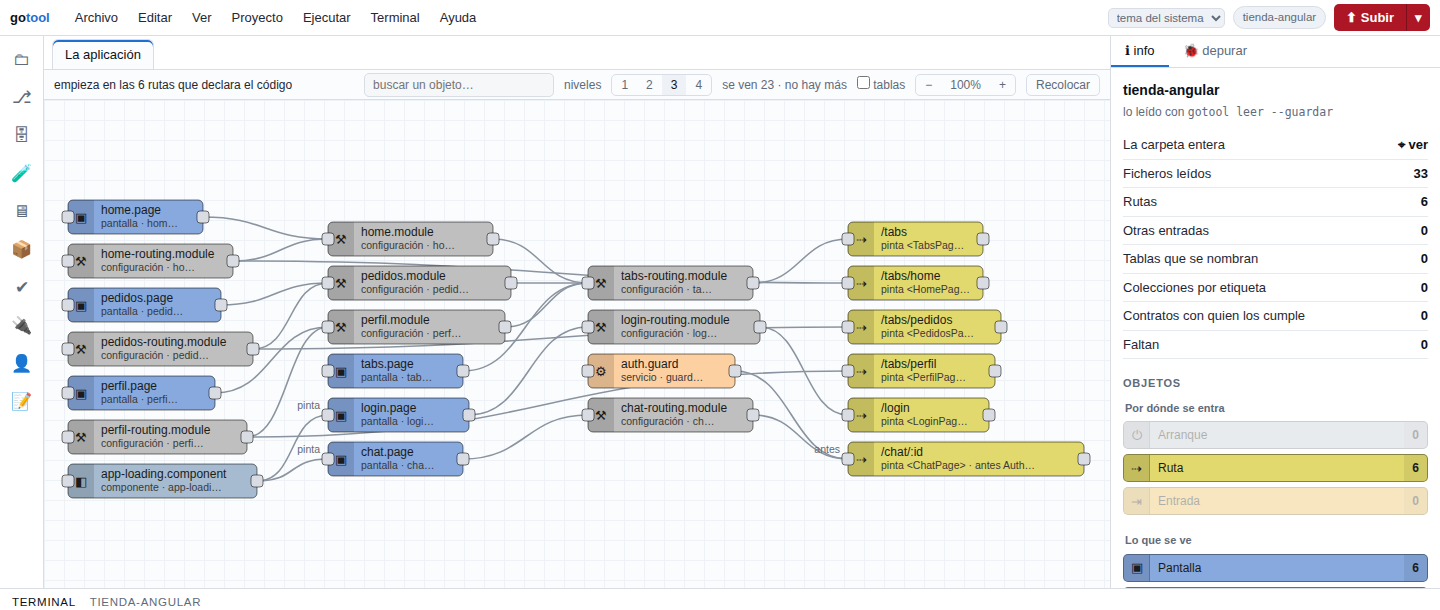
The map of an Ionic application: its routes on the right and, on the left, the modules and pages that render them, with the guard that runs first.

What it is

A program that reads your project the way a newcomer would —what routes it has, what screens, what services, what tables and who calls whom— and the way an attacker would look at it: what was changed without anyone knowing and what is left open. It's not another editor and it doesn't replace your CI: it's what happens between the two, and after.

On your computer

gotool opens the project's IDE: the map, the code, the use cases, the tests, git and a terminal, including your servers' one, inside GoTool. Its 🛡 brings all its security together: your code, its configuration, your libraries, your Docker and your WordPress. And it answers whatever Claude Code asks about the project (gotool mcp).

On the test server

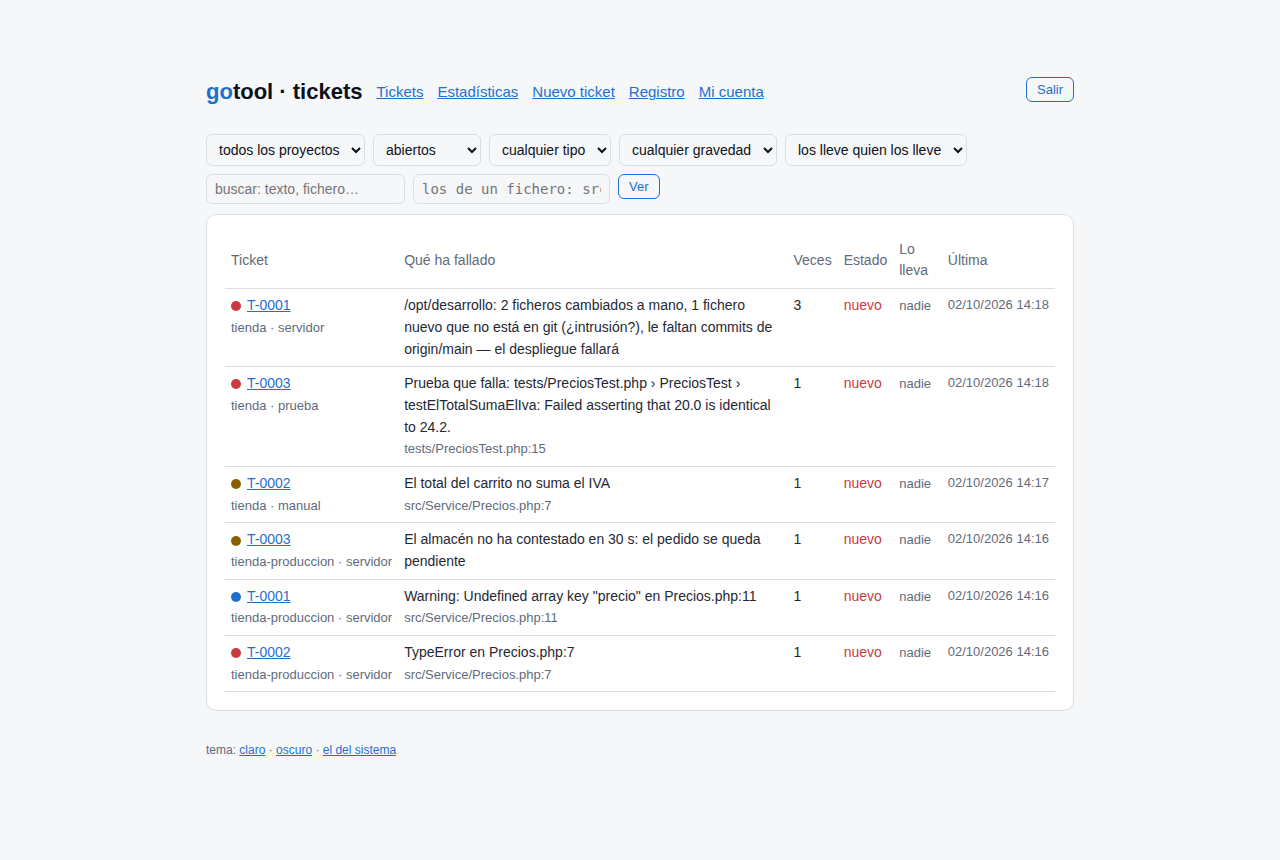
gotool servidor watches the projects and their websites, their WordPress sites, their containers and the machine they run on. It opens tickets on its own when something fails or changes without anyone saying so, and shares them out across the team. Several projects and several people, each with their own access.

1 · Understand and test

Which languages it reads

It reads the code without running it and without installing anything in the project. What it finds is stored outside the project.

PHP

Classes, functions and what each one calls. Symfony: #[Route] routes, commands, services, Doctrine. composer.json, its lock file and vendor/.

TypeScript and JavaScript

React, Angular and Ionic (routes, modules, guards, components, services and their API calls), Node and Capacitor. package.json, tsconfig and node_modules/.

Go

Packages, types, methods and interfaces, and who implements them. Routes for net/http, chi, gin, echo and fiber. go.mod and go.sum.

SQL and databases

The tables the code names and, if you give it access, the real database: MySQL, PostgreSQL or Supabase, always read-only.

Everything around it

sh scripts, the Dockerfile, compose, GitHub Actions and .env files (with secrets masked): who calls whom and which variable each file uses.

And it uses your tools

Tests: vitest, jest, mocha, playwright, phpunit, pest, go test and ng test. Quality: phpstan, psalm, phpmd, phpcs, eslint, tsc, go vet, staticcheck and golangci-lint. Whatever the project already has: it installs none of them.
What it does to understand and test

All from one place. What it runs (tests, use cases, quality checks) is what the project already has; everything else it only reads.

  1. It draws the application

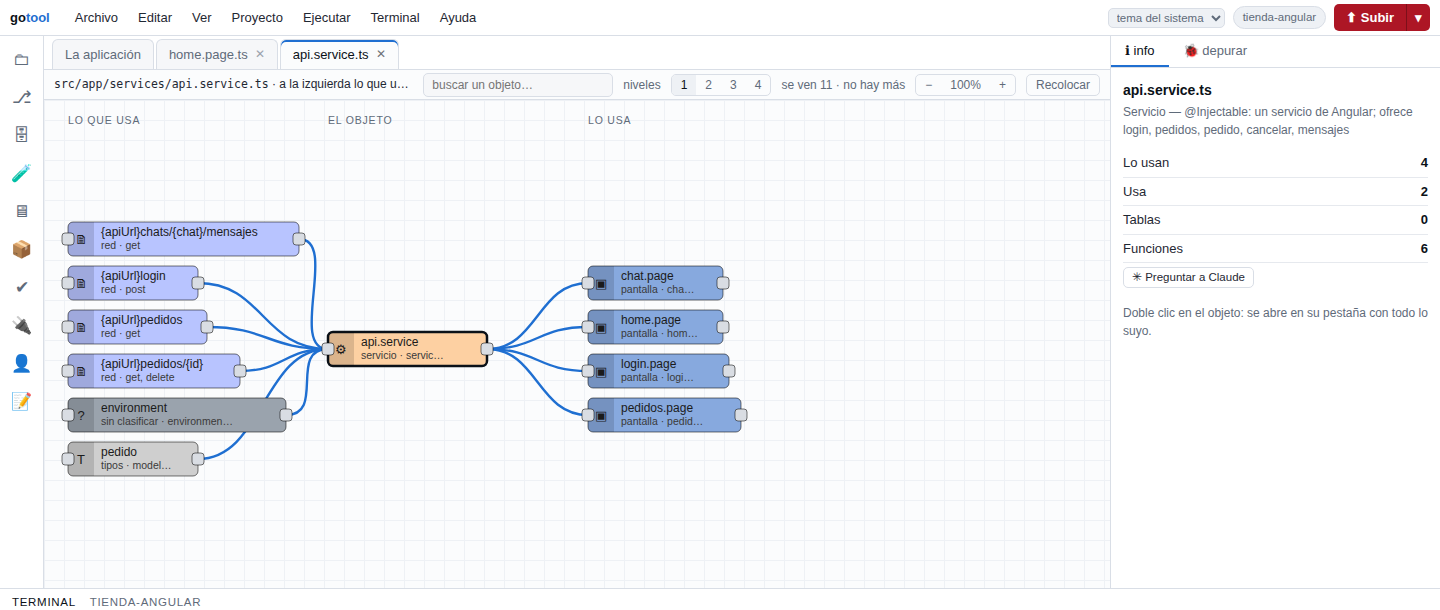
    Where you get in (routes, commands, jobs), what's shown and which services and tables sit behind it. On the left, what each thing uses; on the right, who uses it. Double-click and you're in its code.

  2. Use cases, line by line

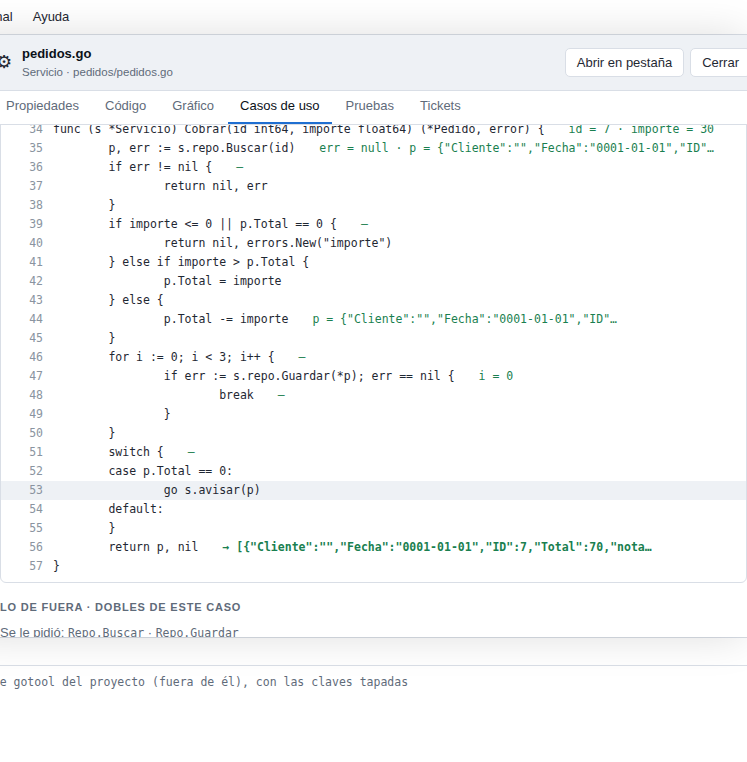
    It runs a function with the data you give it and shows, next to each line, the value of every variable and the path it took. In PHP, JavaScript/TypeScript and Go, with test doubles for the outside world (the database, an API).

  3. Tests with coverage

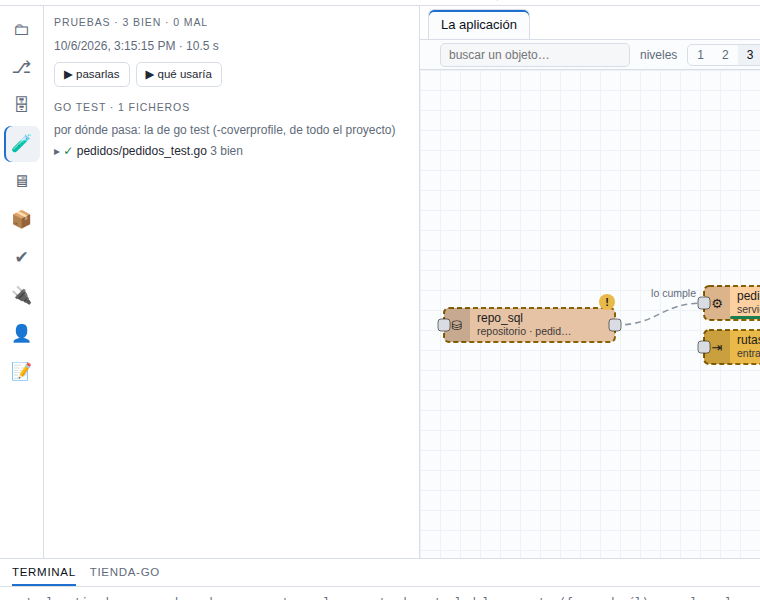
    It runs the tests with the project's own tool, file by file, and records where each one goes: you know which test touches which line and what's left untested.

  4. The blueprint: how it should be

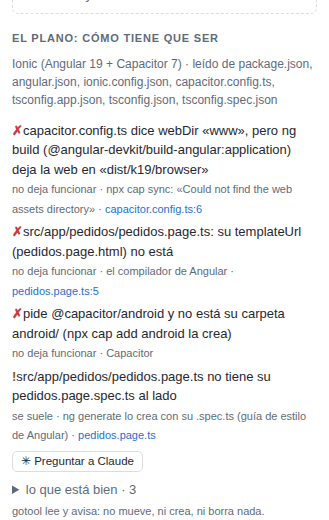
    What the configuration files say versus what's actually there: the missing folder, the template that doesn't exist, the package that isn't installed. With the reason and the line.

  5. Quality and dependencies

    Whether each file passes or not: errors from its tools, complexity, coverage. What's required, what's installed, what has a new version and the known vulnerabilities of each library (OSV).

  6. The database, safely

    It reads it read-only, saves it as DBML and compares it with the contract or an earlier snapshot. It tells you which table or column the code uses that doesn't exist.

  7. Before you push

    gotool comprobar tells you whether a change can go up: tests, quality, dependencies, the blueprint and security. gotool push checks it, runs the use cases and, if everything passes, runs your own git push; then it follows GitHub Actions step by step.

  8. Tickets that open themselves

    On the test server: the failing test, the error in the log, the file changed by hand, the website that stops answering. With its file and line; the Chrome and VS Code extensions bring them to where you work.

  9. With Claude

    Claude Code asks GoTool what it needs about the project. And gotool reparar asks Claude to fix a ticket in a separate copy: it runs the tests and leaves you the patch and the reasoning. Your code doesn't change.

2 · Watch over security

Has someone got in? Are they about to?

The two questions GoTool asks about every WordPress, every container and every machine. The first is whether someone has already got in; the second, whether security is so weak that it's only a matter of time. Every answer comes with where it comes from and what to do.

Compromised: someone is already in

  • The WordPress core, its plugins and themes, compared with what's published on wordpress.org: a file that differs or extra code.
  • PHP in uploads/, new mu-plugins, backdoor code, and new administrators or scripts injected into posts (with its database, read-only).
  • New code inside a container compared with its image: a .php, a .sh, a program that wasn't there.
  • On the machine: new users, keys, startup entries or ports, processes running from /tmp, miners, and connections that look like a reverse shell.

Exposed: it's a matter of time

  • Known vulnerabilities in the core, every plugin and every theme, with “fixed in”; plugins pulled or abandoned; WordPress not updated.
  • Debug mode switched on (WP_DEBUG, APP_DEBUG, Django, Flask, Express), sample keys or keys in the code, open CORS.
  • Containers running as root, --privileged, with the Docker socket inside or without limits; :latest images.
  • What can be seen from outside: the user list, xmlrpc.php, debug.log, copies of wp-config.php, .git; headers, https and old TLS.

Where it looks

Your WordPress

On the server, every 15 minutes, and on your computer when you open the project's 🛡. The official checksums from wordpress.org and the vulnerabilities from wpvulnerability.net, kept so it doesn't depend on them answering. Bedrock too.

Your containers

Docker and Podman, through a read-only proxy: how each one runs and what has changed inside. The Dockerfile and the compose file, against the container guidelines; and the images with trivy or grype if you have them.

The machine

Ports, firewall, users, keys, sudo, what starts on its own, system updates and privilege escalation. The first time, a snapshot to review; from then on, every change is a ticket. Every finding with its CWE and its MITRE ATT&CK technique.

Who each process calls

The sentinel spends seven days learning what's normal for each process and container. After that, a new destination is a ticket; a shell or a network tool calling out, mining or Tor ports, always high. In WordPress, which plugin makes each call.

Your code and its configuration

Hand-built SQL, XSS, unchecked certificates, secrets in the code, with their CWE and OWASP category. And what each project says about itself: PHP, Symfony, Laravel, Node, Next, Django and Flask, every rule with its source.

What you install

gotool npm ci and gotool composer install download the libraries into a separate folder without running anything; they check for malware, known vulnerabilities and what's new in each version, and only then move them into the project.

The same on your computer as on the server: most people build their Docker with their WordPress, test it and push it. Better to know before.

And with what it finds

A list of issues fixes nothing. GoTool puts it where it can be seen, says whose each one is and checks that it really has been fixed.

  1. What's serious, in plain sight

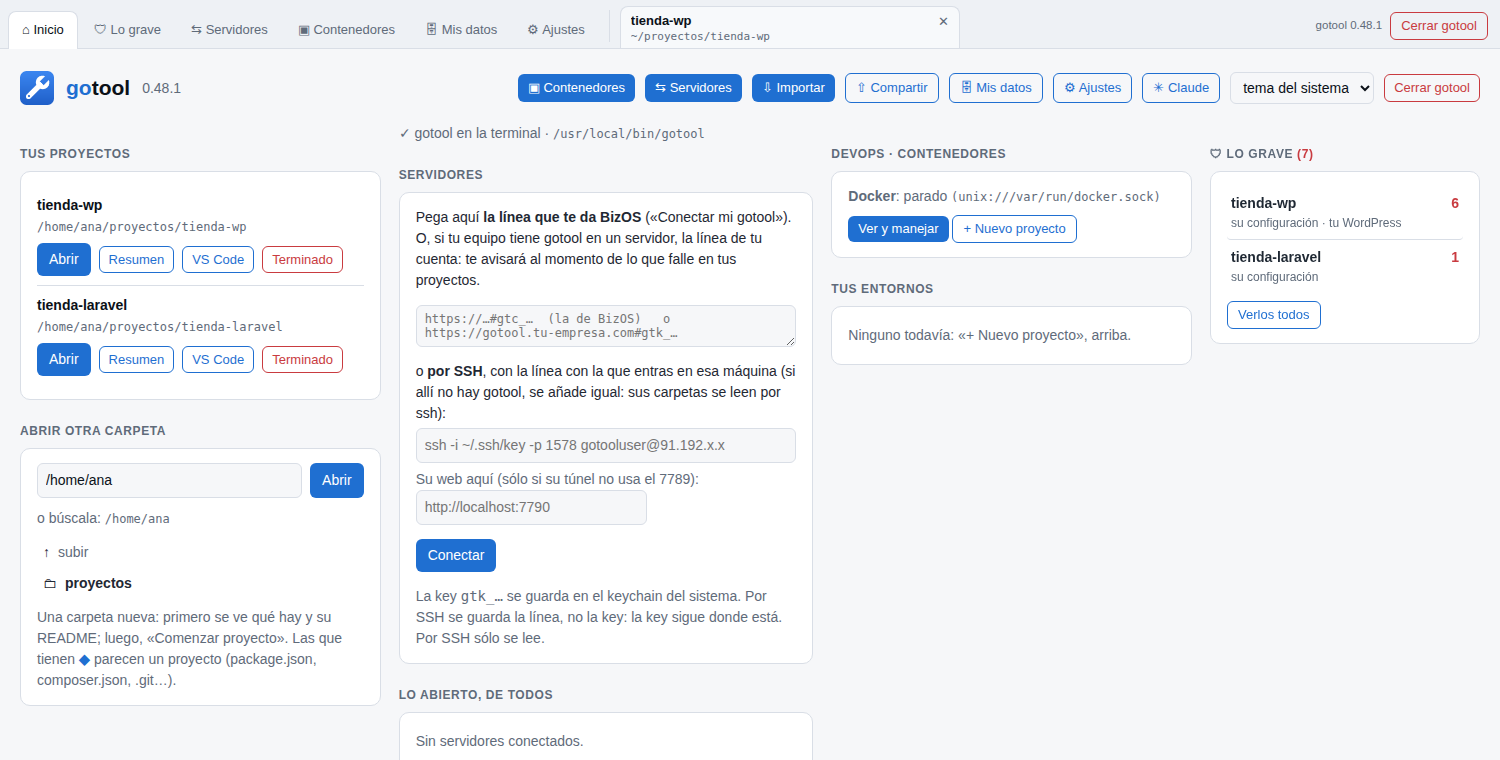
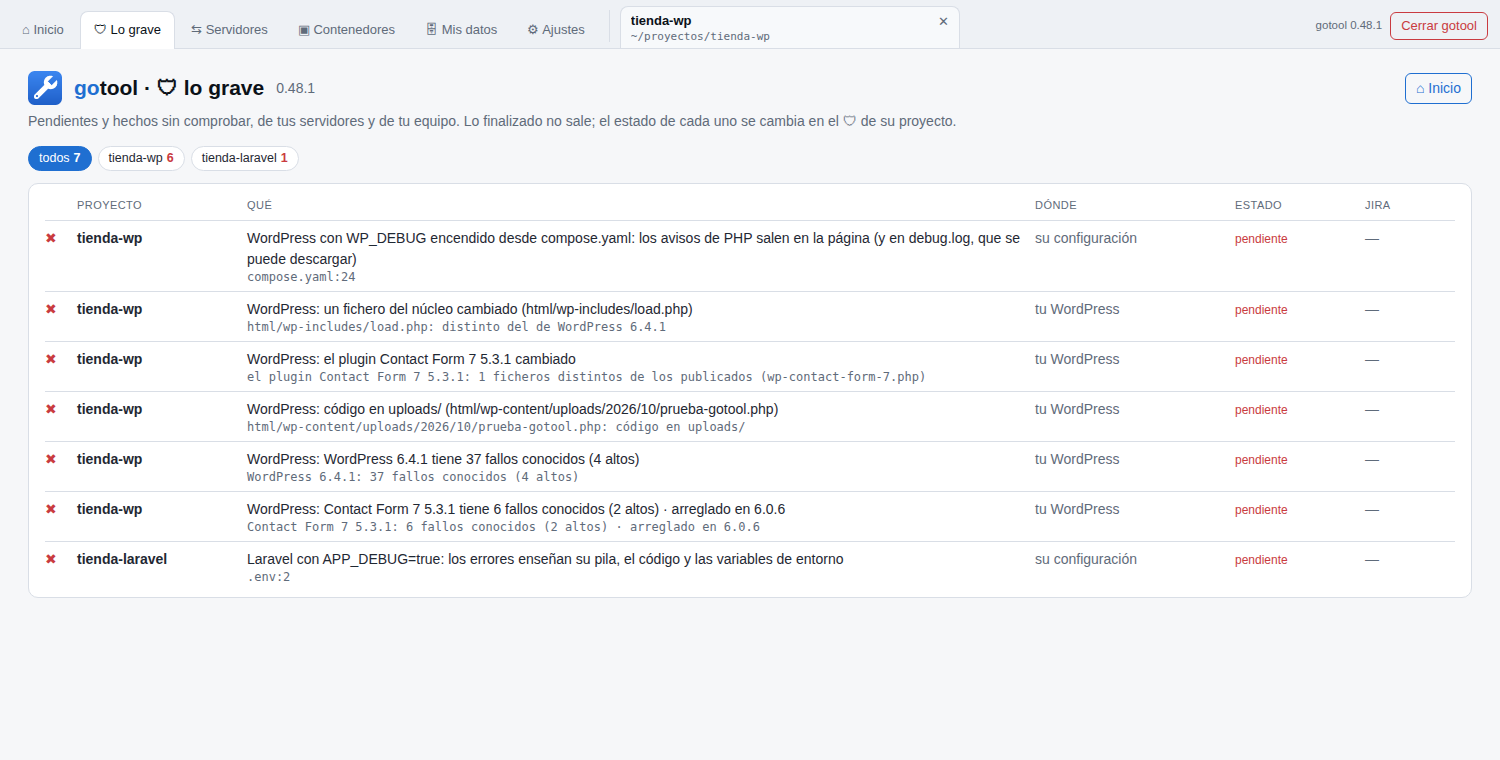
    On the Home screen, how many serious issues each project has, from your servers and from your computer. In the «🛡 Lo grave» tab (what's serious), the full list; in each project's 🛡, everything about it.

  2. Every issue, with its status

    Pending, done or closed. Whoever fixes it says “done” and GoTool checks it on its next round: if it's still there, it goes back to pending. What's expected is closed with its reason.

  3. With your Jira

    If you use Jira Cloud, an issue becomes a ticket from the 🛡, with no keys or IPs. When Jira marks it as finished, GoTool checks it as always.

  4. The gate

    gotool comprobar and gotool push stop on a secret you're about to push, a tampered WordPress, new code in a container or debug mode switched on.

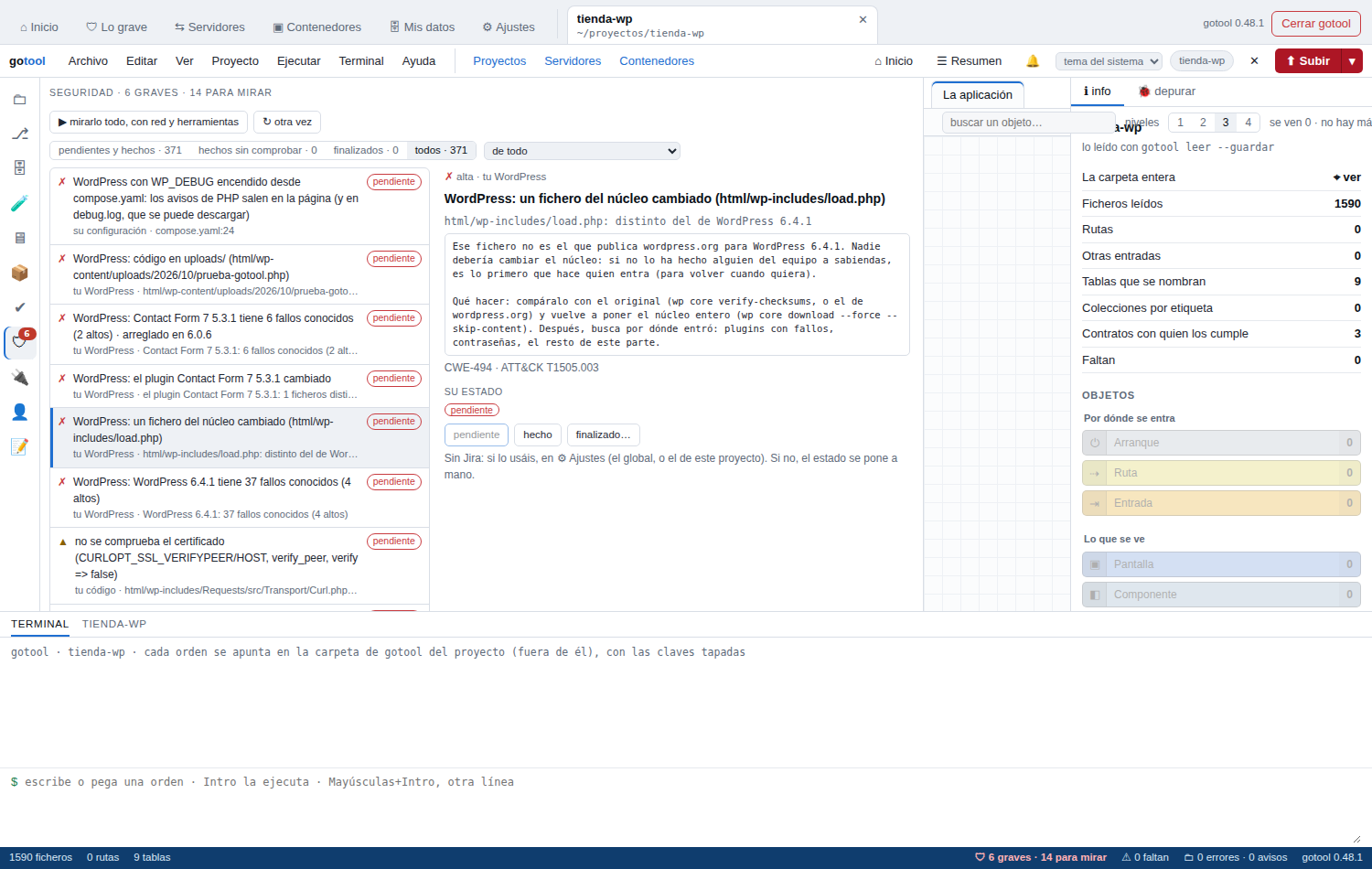
The «🛡 Lo grave» tab (what's serious): what comes from your servers and from your computer, for all your projects.

Who it's for

Between writing the code and the CI/CD passing it there's a gap: understanding it, testing it and knowing what breaks. And after pushing it there's another: knowing whether someone has tampered with it. Today people fill both by hand. GoTool does it for them.

For QA

  • You see the whole application without reading code: routes, screens, services and tables, on one map.
  • A use case shows what happened line by line, with the values. No more “works on my machine”.
  • Tickets open themselves on the test server, with their file and line, and get assigned.
  • You know which test covers what, and what's left uncovered, before you call something tested.

For developers

  • You understand a project that isn't yours in minutes: where you get in and what each part touches.
  • You test a function with some data without spinning up the database or the API: GoTool makes the doubles.
  • Before the push you know what breaks: tests, quality, dependencies with known vulnerabilities and the blueprint.
  • Claude Code asks GoTool about the project instead of reading files one by one.

For people who run WordPress sites

  • You know whether each WordPress has already been tampered with: core, plugins and themes against what's published.
  • You see which plugin has known vulnerabilities and which version fixes them, before someone else finds them.
  • You test it in your Docker before pushing it, with the same rules as on the server.
  • You know which plugin calls where: a new host for a plugin is a warning.

For people who run the servers

  • The machine reviewed every 15 minutes: what has changed since the snapshot, with its reason if it's expected.
  • The running containers, how they run and what has appeared inside them.
  • Who each process calls, and a warning when it calls somewhere it never called before.
  • Root to read, not to change: no network, read-only disk and only the capabilities it needs.

And everyone looks at the same thing: the same map, the same case, the same issue with its status. Whoever finds it says “it's here”; whoever fixes it opens it, sees it and says “done”.

Screenshots

Taken with sample projects: a shop in Angular/Ionic, another in Go and another in PHP, and a test WordPress tampered with on purpose. Click one to see it full size.

The map of an Ionic application: its routes on the right and, on the left, the modules and pages that render them, with the guard that runs first.
A Go use case, line by line: each variable's value next to its line and the path it took.
A Go project's tests with go test: how many pass and where each one goes.
The blueprint of an Ionic project: what angular.json, capacitor.config.ts and the tsconfig files say, versus what's there.
An Angular service: on the left, the API calls it makes; on the right, the pages that use it.
Tickets on the test server, across several projects: GoTool opens them by itself, with their file and line.
Home: your projects and, on the right, how many serious issues each one has.
The 🛡 of a project with WordPress: everything in one list and, on the right, each issue with its history and status.
The «🛡 Lo grave» tab (what's serious): what comes from your servers and from your computer, for all your projects.

None of them shows anyone's code: they're projects made for trying GoTool.

What GoTool never does

  • It doesn't change your code. It only saves what you type in its editor; its own data (the map, tests, database snapshots) goes into its own folder, outside the project.
  • It doesn't install anything in the project. It uses the tools already there.
  • It doesn't write to your database. It reads it read-only, your WordPress one too (no passwords or emails).
  • It doesn't commit or push on its own. Only when you ask it to.
  • It doesn't show your secrets. .env files and keys come out masked.
  • It doesn't change your servers. The machine review and the sentinel run as root to read, not to change: what they see, they report.

How to try it in 10 minutes

With a test project of yours, on your own computer. No server needed.

  1. min 0–1

    Ask us for GoTool

    Write to us below and we'll send you the build for your system (Mac, Windows or Ubuntu) with its SHA256. It's one file: there's no installer.

  2. min 1–2

    Open it with a folder

    Double-click it (or run gotool in a terminal) and pick the project's folder. First it shows you an overview: what's there, how many lines and what it looks like. Read-only.

  3. min 2–4

    Look at the map

    Click “Comenzar proyecto” (start project): it reads it all and draws it. Go up a level to see more and double-click any box to jump to its code.

  4. min 4–6

    Run the tests

    In 🧪, “pasarlas” (run them): it uses the project's own tool and tells you which pass, which don't and where each one goes.

  5. min 6–9

    A use case

    Open a service, “Casos de uso” (use cases) tab, give it some data and press ▶. Every line with its values; GoTool doubles the outside world.

  6. min 9–10

    The 🛡 and before pushing

    Open the project's 🛡: its security, with every issue and its status. And gotool comprobar: what would stop a push and what's just a warning.

Use a test project or a copy, never production: GoTool doesn't change your code, but tests and use cases really run yours.

Contact

Want to try it, have a team, some WordPress sites or servers to watch over, or a question? Write to us and we'll answer from info@gotool.run.

Thank you: we've got it. We'll reply from info@gotool.run.

We only use your details to reply to you. This website doesn't store them or share them with anyone.