Click an object on the screenshot
A button, a field or an image: its attributes, the file and line where it lives, and the layer it belongs to.
goTool › Development
For development and QA
You open a screen and goTool tells you what it's made of and where everything goes: the button, the API call, the back-end route, the functions it runs, the tables it touches and what it returns. Then you test it line by line with your own data.
▣ /business-plan/dashboard
├ 🧩 Dashboard.tsx · KpiCard.tsx · api.ts
└ ⇄ GET /api/plans/:id       Dashboard.tsx:42
   ├ 🚪 server/routes/plans.ts:18
   │    goes through first: auth, permissions
   ├ ƒ  getPlan() → computeKpis()
   ├ 🗄 plans    read   id, name, user_id
   ├ 🗄 kpis     create plan_id, value
└ ↩ returns { plan, kpis, alerts }In «🧩 What it's made of», each screen opens as a tree. The front and the back, with their file and line, and one click takes you to the code.
Its real address, also when the route is nested (/business-plan/dashboard). «Another screen» jumps to any of them.
Its components, styles, utilities, libraries and the other screens it leads to.
Every address, with who calls it (file:line).
The method and its file, and what it goes through first: the session middleware, the permissions…
What that route calls, and what each of those calls, up to four levels deep.
Which table it touches, for what (read, create, update, delete) and with which columns.
The keys of the response, so you know what reaches the screen.
It starts with React and a Node/Express back end. More frameworks are coming, step by step.
A button, a field or an image: its attributes, the file and line where it lives, and the layer it belongs to.
An image's alt, a button's aria-label, lazy loading, autocomplete or a link's noopener.
Folders closed; one click gives you their summary: how many files, of what type, what's wrong and their screen.
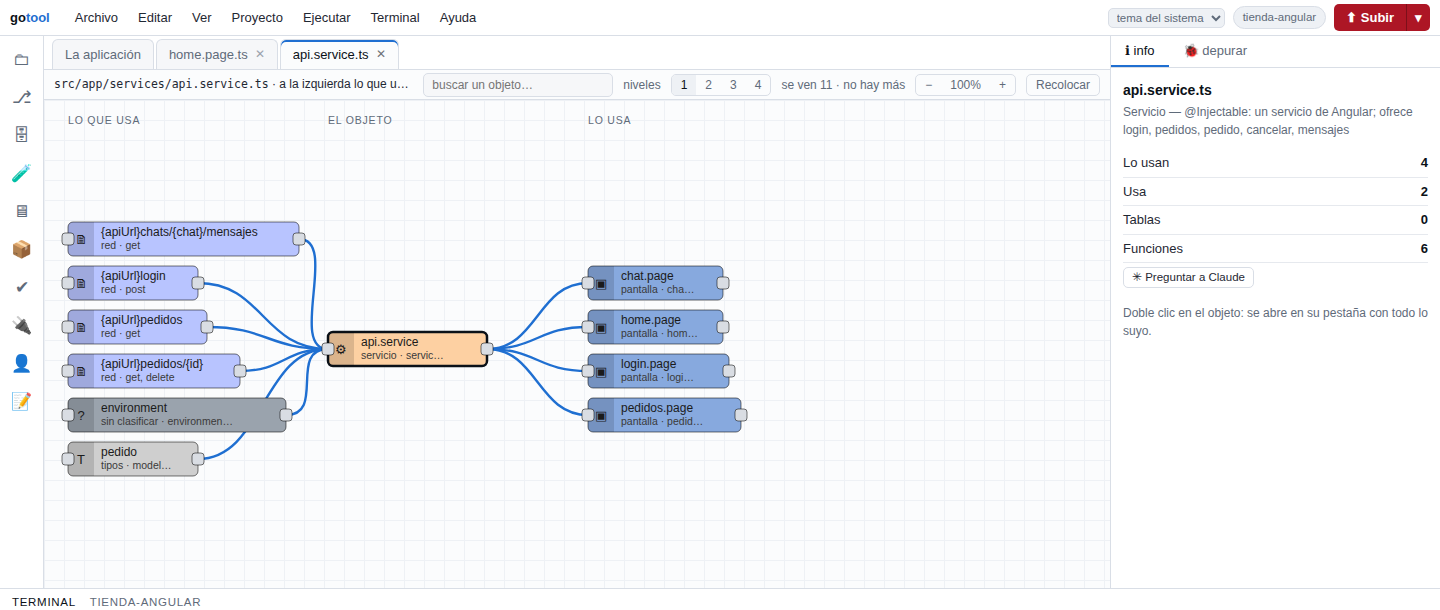
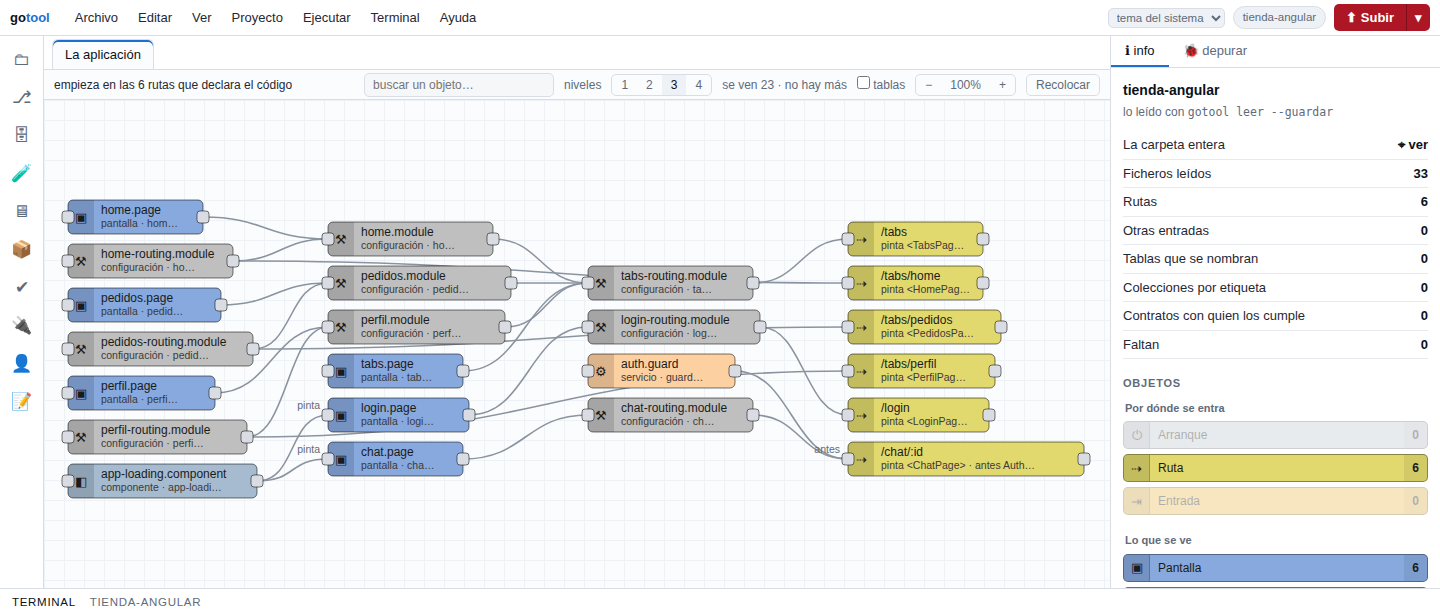
Where you come in (routes, commands, jobs), what you see and what's behind it. On the left what each thing uses; on the right, who uses it.
What runs is what the project already has; everything else is only read.
It runs a function with the data you give it and shows, next to each line, the value of every variable and the path it took. In PHP, JavaScript/TypeScript and Go, with doubles for whatever is outside (the database, an API).
With the project's own tool (vitest, jest, playwright, phpunit, pest, go test…), file by file: which test touches which line and what is left untested.
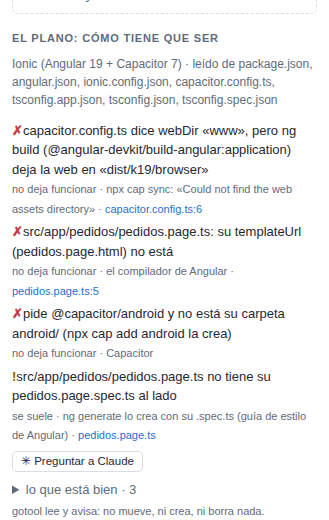
What the configuration files say against what is there: the missing folder, the template that doesn't exist, the package that isn't installed.
Errors from phpstan, eslint, tsc, go vet…, complexity, leftover debugging, the files that change most and who touches them, and a grade from A to F.
What is required, what is installed, what has a new version and the known vulnerabilities of each one (OSV). gotool npm ci and gotool composer install check what comes in before it does.
Read-only: it saves it as DBML, compares it with an earlier snapshot and tells you which table or column the code uses that doesn't exist.
gotool comprobar tells you whether a change can go up. gotool push checks it, runs the use cases, does your git push and follows GitHub Actions step by step.
Each website's profile (its PHP, its database, its extensions) and its twin container, on your Mac or on the server, to test before you change anything.
On the server: the failing test, the log error, the file changed by hand, the website that stops answering. With their file and line.
Everything goTool sees can be requested as JSON.
claude mcp add gotool -- gotool mcp. Claude Code asks about the project, an object, what breaks or what's missing, and gets JSON back.
Write in ✍ how you do things and what needs doing. «📋 For Claude» copies the sentence with the path, ready to paste.
Which AI model fits and runs well on your machine, with the list updated every day. It installs and downloads nothing.
cd ~/projects/my-shop
gotool vistazo      # what it's made of
gotool leer . --guardar   # the map: files, routes and tables
gotool probar       # the tests, file by file
gotool comprobar    # what would stop a push
gotool mcp          # for Claude Code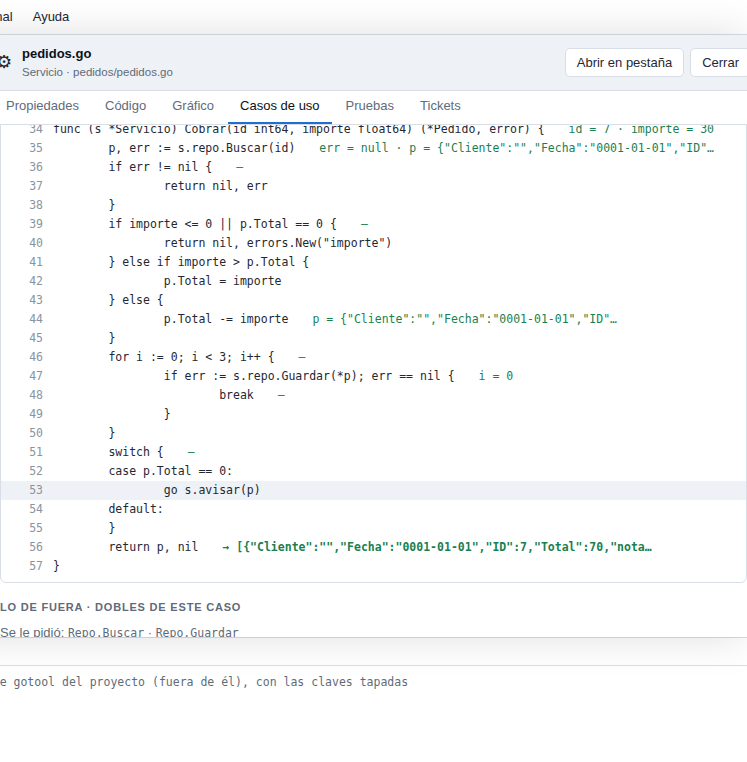
A function really run with the data you give it. goTool shows, line by line, the value of every variable and the path it took, and doubles whatever is outside (the database, an API) so you don't need to start it.
Open the screen and look at «What it's made of». It follows every API call to the back-end route, its functions and the tables, with the operation and the columns, and what it returns.
No. goTool reads the code without touching it, uses the tools the project already has and keeps its own data in its own folder.
Yes. You see the whole application without reading code, each use case shows what happened with its values, and you know which test covers what before saying something is tested.